

What Is an eSIM, and How Does It Work?
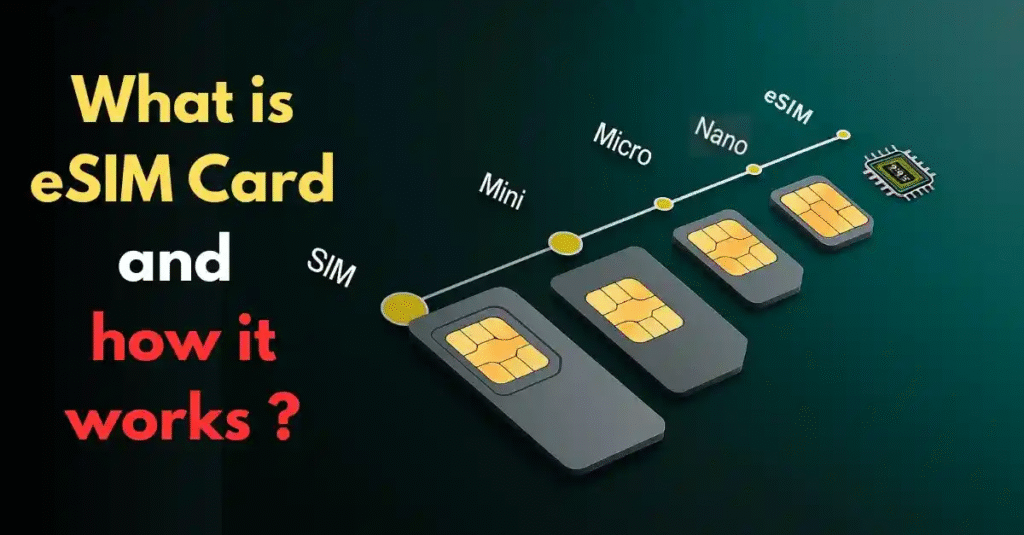
An eSIM (embedded Subscriber Identity Module) is a digital SIM card integrated directly into a device’s hardware, such as smartphones, tablets, smartwatches, or IoT devices. Unlike traditional physical SIM cards, which you insert into a device’s SIM tray, an eSIM is a programmable chip soldered onto the device’s motherboard. This chip stores carrier profiles, enabling users to connect to mobile networks without needing a physical card. The eSIM technology is revolutionizing connectivity by offering seamless network switching, an eco-friendly design, and enhanced user convenience. Major devices like the iPhone 14/15 series, Samsung Galaxy S23, and Google Pixel 8 support eSIM, making it a standard feature in modern gadgets.
Start Trading With Xbanka Today
H2:How An eSIM Works
You can easily install an eSIM profile (provided by operators/ carriers) on an eSIM-compatible device. You can use multiple operators and subscribe simultaneously to several data plans to suit your needs.
Here are the steps to use the technology on your device:
- Buy an eSIM plan from your network provider.
- You will get a QR code and additional information via email or the network’s site/app.
- Scan the QR code or enter the details to activate.
H3:What Can You Do with an eSIM
An eSIM is perfect for staying connected while traveling. It offers flexibility and convenience in managing home and foreign numbers. Many travelers use eSIMs to avoid high roaming charges and to access local networks seamlessly. For extended stays, visitors simply reload their eSIM as needed. Tourists hopping between countries often choose regional or global plans that allow connection across multiple destinations. This feature makes eSIMs a hassle-free option for frequent travelers who want reliable, affordable data wherever they are. Beyond travel, eSIMs are popular with international students and those working abroad. Students studying in a new country can keep in touch with friends and family back home while staying connected locally.
H3:Why Choose eSIM? The Benefits
eSIM technology comes with several advantages:
- Convenience: No more dealing with small SIM cards or tools to change them. With an eSIM, switching carriers is as easy as downloading a new profile.
- Multiple Devices: eSIM isn’t just for phones; it’s also available in devices like tablets, smartwatches, laptops, and even some cars. This means you can stay connected across all your devices.
- Future-Proof: As more devices adopt eSIM technology, traditional SIM cards might become obsolete. By using eSIM now, you’re ready for the future of mobile connectivity.
H3:How to activate an eSIM card?
Activating an eSIM card is a simple process that involves scanning a QR code provided by your carrier or plan provider. The steps to activate an eSIM card vary depending on whether you’re using an iPhone or an Android device.
- Steps to activate eSIM on iPhoneActivating an eSIM card on an iPhone involves the following steps:
- Go to Settings > Cellular > Add Cellular Plan.
- Scan the QR code provided by your carrier or plan provider.
- Follow the prompts to complete the activation process.
- Switch between your eSIM and physical SIM cards in Settings > Cellular.
- Steps to activate eSIM on Android devices
The process to activate an eSIM card on an Android device varies depending on the device and operating system version. However, the general steps are as follows:
- Go to Settings > Network Internet > Mobile network > Advanced > Carrier > Add carrier.
- Select “Add a new plan” or “Scan QR code.”
- Scan the QR code provided by your carrier or enter the activation code manually.
- Follow the prompts to complete the activation process.
Once the activation is complete, you can switch between your eSIM and physical SIM cards by going to Settings > Network Internet > Mobile network and selecting the plan you want to use.
H3:Key Features of an eSIM Card:
- Embedded Design: Built into the device, non-removable.
- Multiple Profiles: Store and switch between multiple carrier plans.
- Remote Activation: Download carrier profiles via QR codes or apps.
- Eco-Friendly: Eliminates plastic waste from physical SIMs.
H3:What Does an eSIM Look Like?
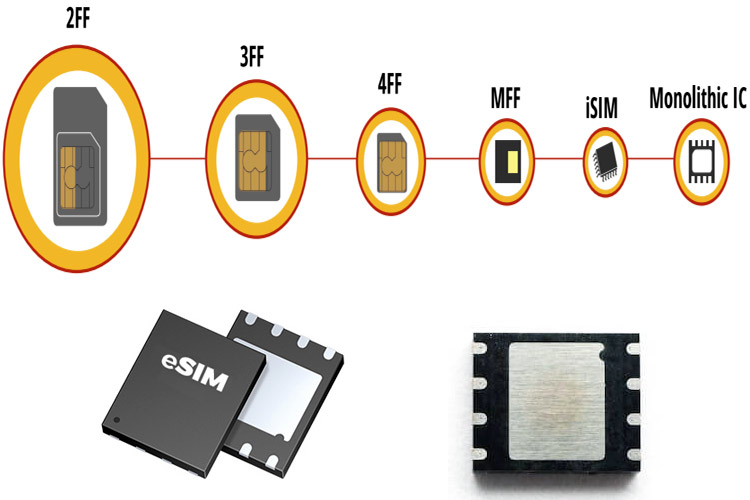
Unlike a traditional SIM card, which is a small plastic card with a visible chip, an eSIM card is not something you can physically see or touch without dismantling your device. Here’s a breakdown of its appearance:
Physical Appearance:
- Microchip: The eSIM is a tiny chip, typically a few millimeters in size, embedded in the device’s circuitry during manufacturing. It’s not user-accessible and is soldered onto the motherboard, making it invisible to the average user.
- No SIM Tray: Devices that rely solely on eSIMs, like some newer iPhone models, lack a physical SIM card slot, giving them a sleeker design.
Digital Appearance:
- Settings Interface: On your device, the eSIM appears as a digital profile in the settings menu. For example:
- On iOS: Navigate to Settings > Cellular > Add eSIM.
- On Android: Go to Settings > Network & Internet > Mobile Network > Add Carrier.
- QR Code or Activation Code: When activating an eSIM, carriers provide a QR code (via email, app, or paper) or an activation code. Scanning this code downloads the carrier’s profile to your device.
H2:Which devices support eSIM?
eSIMs are available on smartphones, tablets, smartwatches, cars, and some IoT devices.
H3: Which phones support eSIM?
Popular phone brands like Apple, Samsung, and Google Pixel manufacture many phone models that support eSIM.Google’s Pixel phones have had eSIMs since 2017, Apple’s iPhones since 2018, and Samsung’s Galaxy since 2020. The latest iPhone model can even store up to 8 different eSIMs simultaneously. Apple’s decision to only offer an eSIM-only iPhone 14 in the US has significantly accelerated eSIM adoption.
Trade Your Gift Card On Xbanka
H3: Which tablets and laptops support eSIM?
While less common than in smartphones, some tablets and laptops also support this new technology. Here are some examples of tablets working with eSIM:
- Apple’s iPad: iPad models released since 2018, including the cellular-enabled versions of iPad Pro, iPad Air, and iPad mini.
- Samsung Galaxy Tab: Certain models within the Galaxy Tab series, especially higher-end ones, support eSIM.
- Microsoft Surface Pro: Some new Surface Pro models with cellular connectivity have eSIM capability.
H3: Limitations of an eSIM
While eSIM has many benefits, there are a few downsides to consider:
- Device Compatibility: Not all phones or tablets support eSIM yet. Before switching, check if your device is compatible. The good news is that more devices are starting to support eSIM.
- Carrier Support: Although many major carriers offer eSIM plans, not all do. It’s important to ask your carrier if it supports eSIM technology.
- Potential Lock-In: Some carriers might lock your eSIM to their network, making it harder to switch to another provider. Be sure to understand the terms before signing up for an eSIM plan.
H3:How to Set Up an eSIM on Your Phone.
You can use an eSIM with compatible devices by following these steps:
- Obtain an eSIM Plan: Contact your carrier to request an eSIM plan. They will usually provide a QR code, either digitally or physically, which you’ll need to use the digital SIM card. Some carriers also allow you to download an eSIM plan directly through their app or from your phone’s settings.
- Scan the QR Code: Use your phone’s camera to scan the QR code. Once scanned, your device will automatically download the eSIM information and activate your number.
- Activate Your eSIM: Open your phone’s settings and navigate to the network or mobile data section. this is typically under the SIM management menu. Find and tap on the eSIM option. Follow the prompts to activate your digital SIM card.
H3: Difference between eSIM and physical SIM card
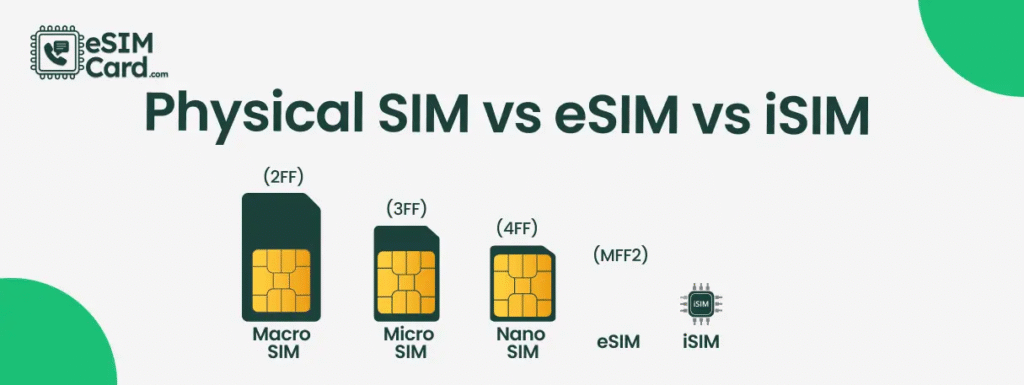
The main differences between eSIM and physical SIM cards are their form factor and how they store subscriber information. A physical SIM card is a small plastic card that contains a microchip, while an eSIM card is built into your device and stores subscriber information digitally. Additionally, a physical SIM card can be removed and swapped between devices, but an eSIM card cannot.
Summary:
- Form factor: a physical SIM card is a small plastic card containing a microchip, while eSIM is built into the device.
- Subscriber information: Physical SIM cards store subscriber information on the microchip, while eSIM stores it digitally.
- Swappability: A Physical SIM card can be removed and swapped between devices, while an eSIM cannot.
Conclusion
We can not overemphasize the rate at which technology is going to ensure convenience and flexibility, which is what eSIM offers its users. This feature is easy to use, and you do not need to change physical SIMs all the time because you are traveling or have a bad signal. However, it is imperative to know the advantages and disadvantages of this technology, as highlighted in this article, to help you understand how best to use it.
FAQ
- Do you keep your phone number with an eSIM?
You can continue to use your phone number while using the data from your eSIM as long as your phone has dual SIM technology. This way, you can keep receiving calls and messages from your home line while connecting with your eSIM data plan.
- Can I use both a physical SIM and an eSIM?
You can use Dual SIM by using a physical SIM and an eSIM. iPhone 13 models and later also support Dual SIM with two eSIMs, in addition to a physical SIM and an eSIM.
- Can I switch back and forth between SIM and eSIM?
Turn ON your physical SIM card at the top, and under it, the eSIM profile you want to use: Your physical SIM card and/or your eSIM profile are now ready to be used.
- Does eSIM give you wifi?
Yes. An eSIM works just like a standard SIM when it comes to data. This means you can create a personal hotspot and share your data connection with other devices.
- Can I make international calls with eSIM?
eSIM plans with call and text services provide an international number that allows you to make phone calls and send text messages abroad. If you have a data-only eSIM plan, you can still make phone calls, but you will need to use an internet-based calling app (like WhatsApp), social media, or your primary number.
- Does an eSIM change your phone number?
TL;DR: Installing an eSIM does NOT change your phone number. Your primary number (linked to your carrier’s physical SIM or primary eSIM) stays the same. A travel eSIM simply adds a second data line so you can keep receiving calls and texts on your main number while using the eSIM for cheap, fast internet abroad.



