


What is an SM-DP+ Address?
An SM-DP+ (Subscription Manager Data Preparation+) address is a server URL used during eSIM activation to securely download a mobile carrier profile to your device. The GSMA (GSM Association) defines SM-DP+ as a system for managing and provisioning eSIM profiles remotely. When you scan a QR code or use an app to activate an eSIM, your device connects to the SM-DP+ server using this address to retrieve your specific mobile subscription data. It ensures encrypted, secure, and seamless over-the-air provisioning without needing a physical SIM card, enabling modern, flexible mobile connectivity.
How Important is an SM-DP+ Address?
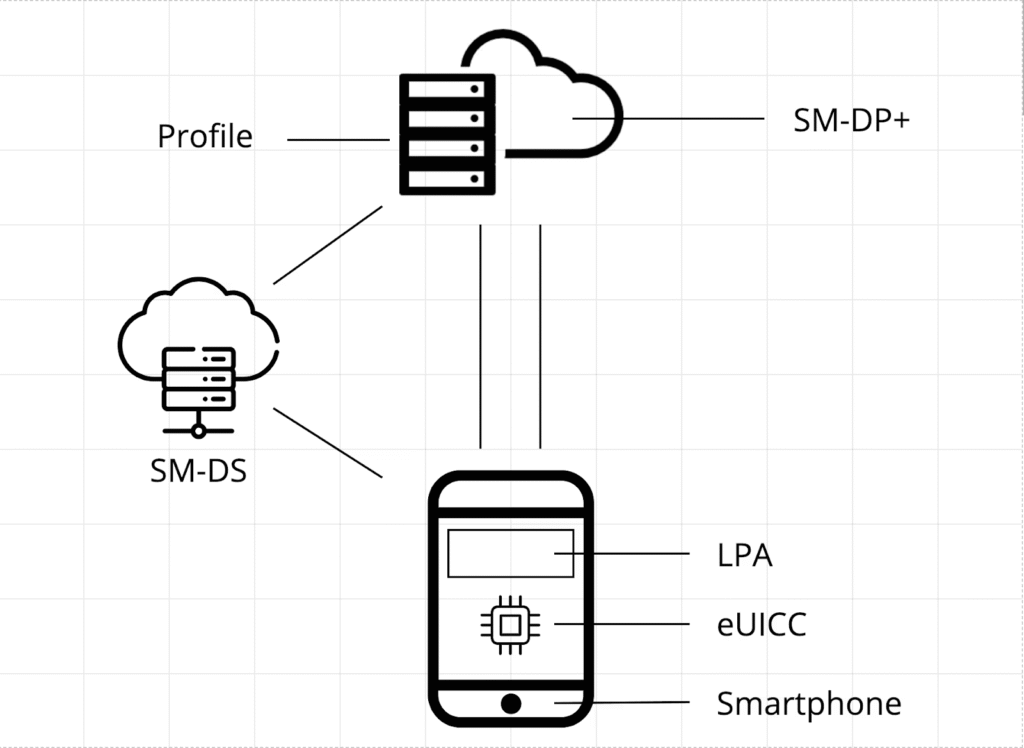
The SM-DP+address is a crucial facet of an eSIM’s activation process and overall security. Let’s start by discussing the significant role it has to play in an eSIM’s activation. Upon activating your eSIM, your device will send a request to the SM-DP+ server. This server cross-references the SM-DP+ address with the eSIM’s activation code, resulting in the validation of your device’s iden
Activating an eSIM isn’t just about pressing a button or scanning a QR code. It’s a blend of secure data transfers, encryption, authentication, and profile installation. Here’s where the SM-DP+ steps in.
When you’re setting up an eSIM:
- The device contacts the SM-DP+ server using the provided address.
- Authentication occurs to verify the device and user.
- The server delivers the operator profile (including your phone number, carrier settings, and security credentials).
- The profile is installed and activated on your device.
How Does an SM-DP+ Address Work?
What you know of the SM-DP+ server clearly shows that it plays a large role in securely storing and maintaining eSIM profiles, safeguarding them from potential threats. So, when you undergo the eSIM activation process, your device connects with the SM-DP+ server thanks to the unique code that is the SM-DP+ address. In other words, your SM-DP+ address acts as the bridge that closes the gap between the SM-DP+ service and your device, enabling the server to recognize and authenticate it. After authentication, your device will acquire the eSIM profile data from the server. The result – your device can configure itself automatically, and you connect to the mobile network, now able to use your eSIM.
How to Find the SM-DP+ Address on Your Phone
Now that we’ve answered the ‘What does SM-DP+ address mean’ queries and other basics, it’s time to get down to brass tacks. As you know, the SM-DP+ address is crucial to creating an eSIM profile, and because of that, it’s also a critical part of the eUICC. The eUICC (Embedded Universal Integrated Circuit Card) is a technology that allows your eSIM to switch between mobile network providers (MNOs) without having to reissue it. The SM-DP+ address can provide you with useful information concerning the eUICC. So, to access/check these features frictionlessly, you need to know where to find the SM-DP+ address on your phone.
Currently, there are two ways you can go about this:
- Contact your cellular provider: You can nearly always find the SM DP address in the PDF that you receive alongside your eSIM. But, if, for whatever reason, you don’t have it or can’t find it, you should contact your cellular provider.
- Scan your eSIM QR Code: When you scan the QR code to activate your eSIM, your device will store information relating to the SM-DP+address. So, once your eSIM profile has been created, you’ll have access to the SM-DP+ address.
How to Set Up SM-DP+ Address for eSIM.
1. How to set up the SM-DP+ Address on Android
Here are the steps to set up the SM-DP+ Address on Android:
- Choose the SM-DP+ address and the activation code in the email sent from your eSIM provider.
- Click “Settings” on your Android device.
- Connections /Network and Internet.
- SIM Manager.
- Add eSIM.
- Select Scan QR code from the service provider > select Enter activation code.
- You will receive this prompt: “Don’t have a SIM card? Select “Enter Manually.”
- Enter the activation code.
- Select next and add the SM-DP+ Address.
2. How to set up the SM-DP+ Address on iPhone
The following are steps to set up the SM-DP+ address on iPhone (or manually enter the eSIM profile).
- Choose the SM-DP+ address and the activation code in the email sent from your eSIM provider.
- Go to “Settings” on your iPhone.
- “Cellular or Mobile Data” > select “Add eSIM / Add Cellular Plan.”
- Use QR code.
- Select “Enter Details Manually.”
- Enter the SM-DP+ address and the activation code.
- Follow the on-screen instructions to rename the eSIM with a new label.
- Set the default line for different lines.
Importance of SM-DP+ Address
1. Security
The address directs the eSIM to a trusted server, where encryption protocols ensure that only authorised users can access the correct profile. This keeps hackers and malicious actors at bay.
2. Scalability
Because the address points to a centralised server, carriers can scale eSIM activations without shipping physical SIMs. This is especially valuable for international travel and IoT applications.
3. User Experience
The SM-DP+ address helps ensure a smooth user experience by enabling seamless provisioning. You don’t need to visit a store, swap SIMs, or wait for shipping.
4. Global Connectivity
With eSIM and SM-DP+ infrastructure, a device sold in one country can be instantly connected to another network. It’s borderless connectivity at your fingertips.
What Happens If You Use the Wrong SM-DP+ Address?
If an incorrect SM-DP+ address is entered or scanned, the eSIM cannot retrieve the profile—it’s like dialing the wrong number or going to the wrong website. You may receive errors like “Unable to activate eSIM” or “Invalid SM-DP+ address.” In most cases, users must re-enter the correct address or request a new QR code from their carrier.
Conclusion
As you can see, finding and setting up the SM-DP+ address isn’t painful, even if you have to do it manually. In fact, we recommend taking the manual approach to setting up SM-DP+ addresses. This way, you have more flexibility and freedom to switch between networks as you travel. So, when your travel companions ask you, ‘What is an SM DP address?’ or you catch them googling things like ‘What’s an SM-DP+ address?’, you can use what you’ve learned today to help them out. Together, we’ll help each other stay connected during our travels.
FAQ
- What to write in the SM DP address?
Subscription Manager Data Preparation Address (SM-DP+ Address) is a unique code your device uses to connect with your carrier’s server during an eSIM setup. It stores your eSIM profile, which includes your phone number, carrier information, and other settings that allow your device to connect to the mobile network.
- What is the SM DP+ address at AT&T?
SM-DP+ Address stands for Subscription Manager Data Preparation Address. It is a unique code that identifies a remote server used to manage eSIMs. In simpler terms, SM-DP+ Address is a code that connects your device to the service provider’s server, enabling you to activate and manage your eSIM.
- Can I convert a SIM to eSIM myself?
Select the SIM that you want to convert. Scroll down your SIM settings. Tap Convert to eSIM. Follow the on-screen instructions.
- What is the SM DP+ format?
SM-DP+ Address, which stands for Subscription Manager Data Preparation Address, is a unique code that identifies a remote server responsible for managing eSIMs. This server plays a vital role in the eSIM ecosystem, enabling the secure download and installation of eSIM profiles onto your device.
- What is the sm dp address while activating eSIM?
An SM-DP+ (Subscription Manager Data Preparation) address is a unique identifier that plays a crucial role in the activation of eSIMs. It serves as a link between your device and the mobile network operator, allowing you to download and activate your eSIM profile.



