


What is the Zenith Bank Transfer Code?

The Zenith Bank Transfer Code is a USSD-based service that lets you perform banking transactions via your mobile phone, without needing an internet connection. By dialling a specific code, you can transfer money, check your account balance, buy airtime, pay bills, and more. The code you need is **966*#—often called the “EazyBanking” code. It’s available 24/7, giving you the flexibility to manage your finances at any time.
Why Use the Zenith Bank Transfer Code?
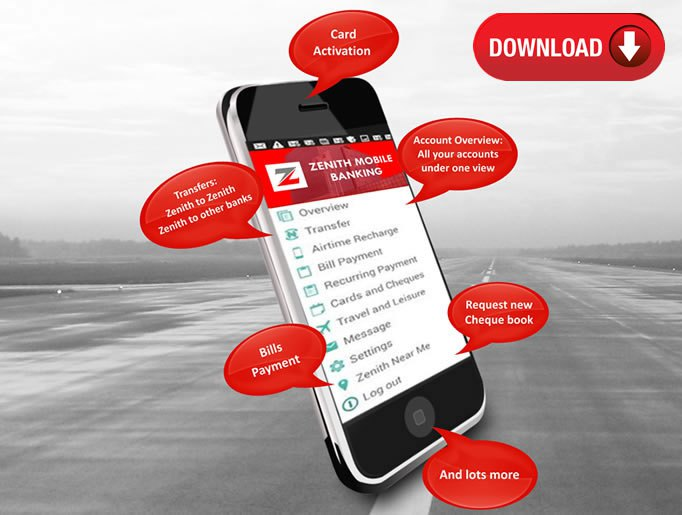
- Convenience
- No need for internet access or visits to the bank. You can complete transactions directly from your mobile phone.
- Accessibility
- Works on all mobile phones, from basic models to the latest smartphones, making it accessible to everyone.
- Speed
- Transactions are processed instantly, so you don’t have to wait long for your banking tasks to be completed.
- Security
- The service includes security features like PIN protection and transaction limits to keep your account safe.
- Cost-Effective
- Generally incurs minimal charges, often lower than traditional banking methods.
How To Activate The Zenith USSD Transfer Code
To activate the Zenith USSD transfer code, you first need to visit a Zenith bank branch to collect your Zenith bank debit card.
There, you can request a Mastercard or a Visa card; you will use the last four digits on any of these cards to activate your transfer code.
Follow the steps below to activate your Zenith Bank code for transfer:
- Dial *966*00# on the phone number linked to your Zenith account.
- Enter the last four digits of the 16-digit number in front of your Zenith Bank debit card.
- Confirm that the account details are correct.
- Create a 4-digit transfer pin for (4 digit secret pin that you can easily remember).
- Confirm the 44-digitpin again.
- You will receive a confirmation SMS once the activation is successful.
- You have successfully activated the transfer code for Zenith Bank on your phone.
Please be advised that you cannot activate the Zenith Bank USSD service without your Zenith Bank debit card. Zenith Bank won’t charge you any fee for activating the USSD code. However, your mobile network will charge you a service fee of 6.98 naira after you’ve activated the Zenith Bank transfer code and every time you use the USSD code to transfer from Zenith Bank to make transactions. The zenith bank USSD code is very secure as it requires a 4-digit secret pin to authorise all transactions. Keep your Zenith USSD pin safe to avoid unauthorised transactions. If you feel that your pin has been compromised, you can either block your account or change your pin.
How to Use the Zenith Bank Transfer Code
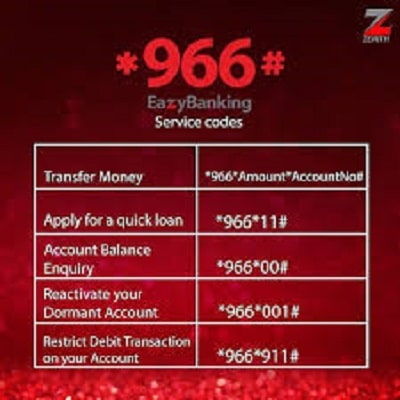
Here’s how you can use the code for various transactions:
- Transfer Funds to Another Zenith Bank Account
- Dial *966*AmountAccount Number#. For example, to transfer ₦5,000 to account 1234567890, dial *966*50001234567890#.
- Confirm the transaction by entering your PIN.
- Transfer Funds to Other Banks
- Dial *966*Amount*Account Number# and select the recipient’s bank from the list.
- Enter your PIN to authorise the transfer.
- Check Account Balance
- Dial *966*00# and enter your PIN to view your balance.
- Buy Airtime for Yourself
- Dial *966*Amount#. For example, to buy ₦500 airtime, dial *966*500#.
- Buy Airtime for Others
- Dial *966*AmountPhone Number#. For example, to recharge ₦500 for phone number 08012345678, dial *966*50008012345678#.
- Pay Bills
- Dial **966# and select the bill payment option. Enter the biller code and amount to pay, then confirm by entering your PIN.
- Open a Zenith Bank Account
- Dial **966# and follow the prompts to open a new account.
Zenith Bank USSD Code For Quick Loan
You can easily be granted a loan by dialling *966*11# from your Zenith Bank account to your Zenith Bank account. Follow these steps to get the transfer code for Zenith Bank’s quick loan.
- On your phone’s caller app, dial *966*11#.
- Kindly follow the displayed instructions on your screen.
- Choose the amount you want to loan.
- The amount of money you asked for will be credited to your account immediately.
Zenith Bank USSD Code To Check Account Balance
- Dial *966*00#.
- Enter your phone number.
- Enter your PIN to proceed.
- In a short time, your account balance will display on the screen, and you will receive a notification on your SMS.
How To Transfer Using the Zenith Bank Mobile App
On your Google Play Store app, download the Zenith Bank mobile app and install it immediately.
- OPEN and log in to your account.
- Click on the transfer option.
- Choose “Transfer to another bank”.
- Be careful to answer the required question that will be asked.
How To Make a Zenith Bank Cardless Withdrawal Without An ATM Card
How possible is it to make a withdrawal without an ATM card? Yes, it is possible. Here we are going to show you the steps to take to achieve it.
- Dial *966*60# and send.
- Choose “5”.
- Enter “7” to choose the cardless withdrawal code.
- Follow the next instruction that pops up.
- A pay code we send to your SMS message.
- Locate the nearest Zenith Bank ATM branch near you.
- On the Zenith Bank ATM, click on the cardless withdrawal/quick teller option.
- Press the button on the ATM card, and select the pay code or cardless withdrawal option.
- Enter the cashout code that is sent to you.
- Your phone number and the amount for withdrawal
- Follow the next instruction on the screen.
- Wait for the ATM to verify your details. Congratulation
Zenith Bank Customer Care
You can call their customer care number for more enquiries or information. Phone number: 234-1-2787000 WhatsApp: +234 704 000 4422. Visit at Email: Zenithdriect@zenithbank.com. OR On Instagram: @zenithbankplc. OR On Twitter: @Zenithbank.
Conclusion
The Zenith Bank USSD code, *966#, is essential for all account holders of this bank. When you start using it, you’ll experience easy banking that curbs the hassle of queuing at the banking hall for something as simple as transferring money to other banks. On that note. We hope that this article has explained some things you wish to know about this USSD service and clarified your doubts about it, too.
FAQ
- Does Zenith Bank have different codes for different branches?
Each Zenith Bank branch has a unique SWIFT code. You can check the correct SWIFT codes for your Zenith Bank branch here.
- Can I check my balance by phone?
Over the phone. Most banks still offer telephone banking services, which allow you to check your account balance by phone. Call the phone number on the back of your debit card (you can also Google for your bank’s general number).
- What is *966 * 911 used for?
Dial *966*911# with any mobile phone number to stop debit transactions on your account if you lose your Debit Card or your account details get compromised.
- What does zenith actually mean?
Zenith means the high point — it comes from astronomy, where it describes the highest point in an arctravelledd by a star, a planet or another celestial body. The sun reaches its zenith when it is as high in the sky as it is going to go on that day.
- How do I know my zenith PIN?
Simply dial *966*60# from your registered mobile number and select “Card pin retrieval” to retrieve your default card pin. Alternatively, kindly visit the branch for further assistance.
- Can I have two Zenith accounts?
RT @missgoldofficia: ” @ZenithBank I have a question please.. can someone open two accounts in one bank??” Yes, please, but they cannot be of the same class, i.e., two savings accounts. Or two current accounts. However, you can have a normal savings account and a Save4me account.



