

What is Cash App?
Cash App is a mobile payment application developed by Square, Inc., a financial services and mobile payment company founded by Jack Dorsey and Jim McKelvey. Cash App, originally known as “Square Cash,” was launched in 2013 and has since gained significant popularity as a convenient way for users to send, receive, and manage money, as well as buy and sell Bitcoin.
Set Up Bitcoin on Cash App
How does Bitcoin work on Cash App? Before we discuss the details, let’s make sure you have access to the app’s crypto features.
1. Make Sure Your Cash App Is Up to Date
The first thing you should do is make sure that your Cash App is properly updated. An outdated app won’t have access to the latest features, including crypto transactions. Open your App Store or Google Play, tap your profile icon, check if Cash App is in the list of pending updates, and update it if necessary. This way, you’ll also get the latest security features and enjoy a bug-free experience.
2. Verify Your Identity
Cash App requires identity verification to unlock Bitcoin operations. It’s a normal procedure meant to prevent fraud and money laundering and further enhance your account security. Better safe than sorry, especially when dealing with high-value assets.
- Launch Cash App and tap the profile icon in the top-right corner.
- Scroll to select Bitcoin from the available options.
- Enter the requested personal details, such as your full name, date of birth, and Social Security number (SSN).
- Follow the instructions and upload a clear photo of your government-issued ID, like a passport or driver’s license.
- Once your identity is verified, you are good to go.
3. Add BTC to Your Cash App Wallet
If you’ve come here looking for how to send BTC on Cash App, you might also wonder, “How do you transfer money from Bitcoin to Cash App?”. There are two ways you can add crypto to your account.
- Buy Bitcoin directly in the app: Find the “Money” tab, select BTC, press the “Buy” button, enter the amount you want to buy using fiat on your cash balance, and confirm your purchase.
- Deposit it from another wallet: Select the “Money” tab and tap the Bitcoin tile, choose “Deposit Bitcoin” to generate a BTC wallet address, copy the address, and use it to transfer the crypto from an external wallet. Note that you’re limited to depositing $10,000 worth of BTC per 7 days.
Features Of Cash App
Cash App is one of the most popular finance apps because they are so versatile. It’s much easier to use than any other bank app. You can do the same thing as traditional banks with Cash App, plus some extra features.
- direct deposits
- buy stocks (as little as $1)
- buy bitcoin
- Get discounts on purchases from select businesses or categories
- non minimum balance
- file taxes
- Send money to other Cash App users via $CashTag or QR code
- money internationally for free
- Send money to users not on Cash App
- set savings goals
- Round up on purchase to savings account
- Round up on purchase to the Bitcoin account
Bitcoin Features of Cash App
Cash App is also the most Bitcoin-focused finance app out there. Some other apps, like Robinhood or PayPal, allow you to trade bitcoin or even send/receive bitcoin, but it’s part of a broader “crypto” strategy, and the user experience is lacking compared to Cash App.
For example, Cash App has enabled seamless lightning deposits and withdrawals, making bitcoin confirmations instant and free.
- round up for saving in Bitcoin
- direct deposits into bitcoin (get paid in bitcoin)
- Recurring Bitcoin buys
- send and receive bitcoin via on-chain or lightning
- Send Bitcoin via $cashtag
Requirements For Converting Bitcoin On Cash App
1. Account Verification
You must first verify your identity by providing personal information like your full name, social security number, and date of birth before converting your Bitcoin to cash on Cash App. This is a KYC (know your customer) process, which is in compliance with the platform’s anti-money laundering (AML) regulations.
2. Linked Bank Account Or Debit Card
In a bid to convert your BTC into a fiat currency, you must link your bank account or debit card to your Cash App. It can take between 1 and 4 business days for the platform to verify a linked bank account or debit card.
3. Sufficient Bitcoin Balance
It is essential to have enough BTC balance in your Cash App wallet to convert to cash. You can only convert up to your total Bitcoin balance minus any pending buy/sell transactions.
How to Send Bitcoin on Cash App?
Now that you’ve completed the setup procedure and learned how to send BTC to Cash App, you’re ready to transfer some BTC.
- Open the Cash App on your smartphone and log in (if needed) to your account.
- Tap the USD symbol to switch to the Bitcoin tab.
- Select “Send Bitcoin.” The “Send” button might appear at the bottom of your screen or under the “More Options” menu, depending on the app version you’re using. Tapping this button will open a new menu where you can input your transfer details.
- Enter the recipient’s details. You’ll need the recipient’s Bitcoin address or Lightning invoice. Double-check the data to ensure that no characters are missing or incorrect, as BTC transactions utilize blockchain technology and are therefore irreversible.
- Specify the amount you want to send. Simply type in the amount in either BTC or USD, whichever is more convenient for you. Cash App will automatically convert USD to Bitcoin based on the current exchange rate. When dealing with significant sums, it is advisable to check the rate in advance, either through the app or online.
- Confirm and send. Remember to double-check all the info you’ve entered! Usually, sending BTC as a gift incurs no fees or commissions. If any fees do apply, they will be displayed to you before confirmation. After confirming all details are accurate, tap “Pay.” You’ll receive a notification once the transaction is successfully processed.
How To Cash Out On Cash App Into a Bank Account/Debit Card
Here is how to withdraw your funds from selling BTC into a cash balance in your Cash App:
- Click “Banking/Activity” on your Cash App home screen.
- Select “Cash Out.”
- Choose your preferred amount and click “Cash Out.”
- Select a deposit speed – “Standard” or “Instant.”
- Confirm with your PIN or touch ID.
Withdraw Bitcoin on Cash App
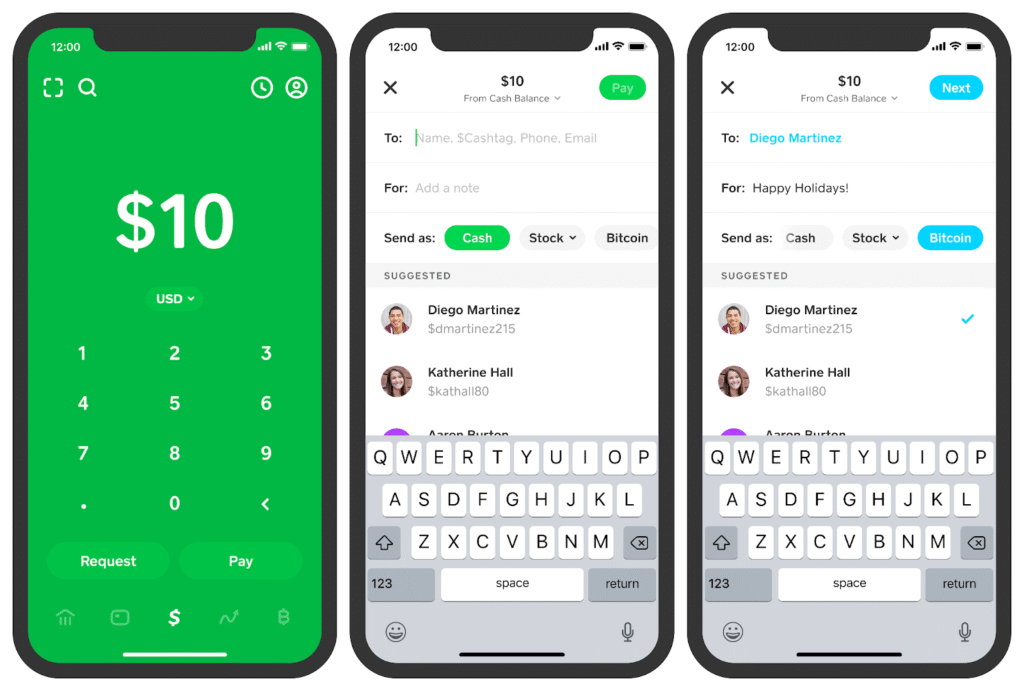
Step 1: Open Your Cash App
Open the Cash App on your mobile device. Make sure you have the latest version installed for the best experience.
Step 2: Tap the Banking Tab
From the bottom menu, tap on the Banking tab. This is where you can manage your balance and initiate withdrawals.
Step 3: Tap Bitcoin
Under the Money section, tap on Bitcoin. This will open your Bitcoin wallet within the Cash App.
Step 4: Tap The Send Arrow To Withdraw Bitcoin
At the bottom of the Bitcoin wallet page, tap the arrow to the right of the Buy and Sell button. This will open a modal asking if you want to send or receive Bitcoin. Assuming you want to send your bitcoin to your own self-custodial wallet, hit the send bitcoin button.
Step 5: Enter Amount and External BTC Address
On the withdrawal screen, tap the amount field to enter the quantity of BTC you wish to withdraw. You can toggle between displaying the amount in USD or BTC. This makes it easy to specify the withdrawal amount in your preferred currency. For this demo, Muun wallet was used, but if you are storing large amounts of bitcoin, it is worth looking into multi-sig or hardware wallet setups so you don’t keep large quantities on a hot wallet.
Step 6: Confirm Withdrawal
Go back to the Cash App withdrawal screen and paste the BTC address into the external address field. You can enter a description like “Withdraw to Muun wallet” so you have a record of what the transfer was for. Carefully review the details of the withdrawal to confirm that the amount and address are correct. Then tap the section that says Bitcoin wallet address and click the next button at the top of the page. Be extremely careful when pasting the address and double-check for accuracy. There is malware that identifies Bitcoin addresses on the clipboard and switches them to another address that the attacker controls. An incorrect address will result in permanent loss of your funds.
Step 7: Confirm & Send
Depending on how quickly you need to receive your Bitcoin, select a withdrawal speed. The faster options have higher fees. In this demonstration, the Standard (slower) option was selected to save on fees. Carefully review all the withdrawal details again. Once you are sure everything is correct, tap “Confirm & Send” to complete the withdrawal. That’s it! You have now successfully withdrawn your Bitcoin from Cash App to your external wallet.
Step 8: Check Status
It may take some time for the Bitcoin network to process the transaction, depending on the withdrawal option you selected in Cash App. To check the status in Cash App, tap the clock icon in the bottom right corner. This will show any pending withdrawals. You can also monitor the status in your external Bitcoin wallet. Look for the withdrawal transaction to show as “Pending” or “Unconfirmed”. Once the transaction has been added to a block on the blockchain, it will display as “Confirmed” in your wallet. Congratulations on taking control of your Bitcoin! Storing it in your own wallet instead of keeping large amounts on an exchange long term is the smart, self-sovereign thing to do.
Why Verify Bitcoin On Cash App
Cash App doesn’t hate you. They’re just doing what most regulated platforms must do: follow rules tied to anti-money laundering (AML) and know-your-customer (KYC) policies. When you verify your identity, you unlock access to all Bitcoin-related features: sending, receiving, buying, selling, and transferring BTC outside Cash App. Until then, you’re stuck at the gate with a locked wallet. It’s also a move to protect you. Verifying gives your account a higher trust rating, reduces fraud risks, and puts you in the good books of financial regulators.
Common Reasons People Delay or Avoid Bitcoin Verification
Before we get into the steps, let’s call out a few common roadblocks:
- Fear of surveillance: Some users worry about sharing personal info like a driver’s license or passport.
- Bad past experiences: Maybe another app took days—or weeks—to approve you.
- Not sure what’s needed: A lot of folks don’t know that blurry selfies or expired IDs cause rejections.
Quick Checklist to Verify Bitcoin On Cash App
To verify Bitcoin on Cash App, here’s what you’ll need:
- A clear selfie for ID confirmation
- A Cash App account with a working phone number and email
- A valid ID (like a driver’s license or passport)
- You must be 18 or older
How to Verify Bitcoin on Cash App
Let’s break it down in real terms, not tech jargon.
Step 1: Update or Download Cash App
Make sure you’re using the latest version of Cash App. Update it from your app store or download it if you’re new. Old versions may not support Bitcoin verification properly.
Step 2: Create or Log In to Your Account
Sign up with your email and phone number. You’ll get verification codes for both—don’t skip them. Cash App won’t proceed without confirming your identity basics first.
Step 3: Navigate to the Bitcoin Section
- Tap the Investing icon at the bottom
- Choose Bitcoin
- Hit the “Enable Withdrawals and Deposits” prompt
This is where the magic starts.
Step 4: Start the Verification Process
Cash App will now ask for:
- Your full legal name
- Date of birth
- SSN (for Americans)
- A government-issued ID photo
- A live selfie
How Long Does It Take to Verify Bitcoin on Cash App?
Once you’ve submitted your ID and selfie, Cash App will start reviewing your information. For most users, verification is fairly quick — but a few things can affect the timing.
What to Expect:
- Most verifications are completed within 24 to 48 hours
- Some users get verified in just a few hours if everything is clear
- In some cases (like unclear photos or high traffic), it might take up to 72 hours
What Can Delay the Process?
- A blurry selfie or poorly taken ID photo
- Mismatched details between your ID and what you entered
- Verifying during busy periods like weekends or market surges
- A manual review triggered by an issue in your submission
Pro Tips to Get Verified Faster:
- Take your photos in good natural lighting
- Double-check that your info matches your ID exactly
- Don’t use screenshots, edits, or cropped versions of your documents
- Try submitting your verification during weekdays when volume is lower
Using Xbanka to Sell Bitcoin

Xbanka is a well-established cryptocurrency exchange platform that offers several advantages to those looking to sell Bitcoin in Nigeria. Here are some of the key reasons why Xbanka is a preferred choice:
- Outstanding Security Measures: Xbanka prioritizes the safety of its users. It employs state-of-the-art encryption and security protocols to ensure your Bitcoin transactions are shielded from potential threats.
- Liquidity and Competitive Rates: One of the key strengths of Xbanka is its liquidity. You can quickly find what you want, when you want it, and the platform offers competitive rates, helping you to maximize your profits.
- User-Friendly Interface: Even if you’re new to Bitcoin trading, Xbanka makes the process simple. Its user-friendly interface guides you through each step, ensuring a smooth trading experience.
- Exceptional Customer Support: Xbanka’s customer support is second to none. If you ever encounter any issues or have questions, their support team is readily available to assist you. They are available 24/7 to attend to your enquiries and complaints.
- Efficient Trade Execution: The platform’s algorithms ensure that your trade is executed swiftly, allowing you to cash in on Bitcoin’s price fluctuations.
- Local Payment Methods: Xbanka is optimized for the Nigerian market, offering a variety of local payment methods, including bank transfers and mobile money.
- Transparent Fees: Xbanka maintains a transparent fee structure, which means you’ll always know the cost of your transactions upfront.
How to Sell Bitcoin on Dtunes
- Create or log in to your Xbanka account.
- Select “Macy’s Gift Card” from the list of supported cards.
- Enter your card details and confirm the trade.
- Receive instant payment in Naira directly to your bank account.
Tips for Safely Buying Bitcoin on Cash App
Buying Bitcoin on Cash App is generally safe, but it’s essential to follow some best practices to ensure your security and peace of mind:
- Enable Two-Factor Authentication: Activate two-factor authentication (2FA) on your Cash App account for an extra layer of security. This will require you to enter a code sent to your mobile device when logging in.
- Keep Your Account Information Secure: Never share your Cash App login information, especially your PIN or account details, with anyone. Be cautious of phishing attempts and email scams.
- Use a Strong Password: Choose a strong and unique password for your Cash App account. Avoid using easily guessable passwords and consider using a password manager to keep track of them securely.
- Beware of Scams: Be vigilant against potential scams and fraudulent schemes. If someone offers you a deal that sounds too good to be true, it probably is. Stick to reputable sources for Bitcoin purchases.
- Double-Check Transaction Details: Before confirming any Bitcoin purchase or transfer, double-check the transaction details, including the recipient’s Bitcoin address. Mistakes in cryptocurrency transactions can be irreversible.
- Stay Informed: Keep yourself updated on the latest news and developments in the cryptocurrency market. Understanding the market trends and potential risks is crucial when investing in Bitcoin.
- Only Invest What You Can Afford to Lose: This is one of the most important rules of investing, which is to only invest what you can afford to lose. The value of Bitcoin can be highly volatile, as with any other cryptocurrency. Make sure you are only investing money that you can afford to lose without affecting your financial stability.
Conclusion
Buying Bitcoin on Cash App is a straightforward and convenient process, making it accessible to both beginners and experienced investors. The platform’s user-friendly interface, security features, and integration of Bitcoin make it a popular choice for those looking to enter the world of cryptocurrency. Remember that, like any investment, buying Bitcoin carries risks. It’s crucial to conduct your research, stay informed, and exercise caution when making financial decisions involving cryptocurrency. Additionally, consider using secure platforms like Xbanka if you ever decide to sell your Bitcoin and convert it back into fiat currency. You don’t need to be an expert to buy Bitcoin. With Cash App, you can start small, learn the basics, and grow from there.
FAQ
- How do I send someone Bitcoin on Cash App?
With Cash App, it is fast and easy to send Bitcoin to a friend or another Bitcoin wallet. First, go to the Money tab on Cash App and tap Bitcoin, then tap the arrows and select Send. Learn more about sending and receiving Bitcoin, limits, gifts, and using the Lightning Network.
- How do I send bitcoins for the first time?
To send bitcoins with confidence, first obtain a Bitcoin wallet. Next, acquire the recipient’s public address and choose an amount to send. Look over the transaction details, then hit ‘Send’.
- How much is $100 in a Bitcoin wallet?
100 USD = 0.00095 BTC. During the past 24 hours, the exchange rate for USD to BTC peaked at $107.36 and fell to a low of $104.77K. The average conversion rate during this period was $106,062.73. In total, the rate changed by -0.58%, reflecting recent market dynamics in fiat-to-crypto conversions.
- Is it safe to send Bitcoin on Cash App?
Cash App is PCI Data Security Standard (PCI-DSS) Level 1 compliant. Your payment information is encrypted and sent securely to our servers, whether you’re using public or private Wi-Fi or a data service such as 3G, 4G, or EDGE.
- How long does it take to send Bitcoin?
In most cases, a Bitcoin transaction will be confirmed within 10 to 60 minutes. This depends on how busy the network is and how much of a fee you attach to your transaction. If you send Bitcoin with a low fee during a high-traffic period, your transaction may take longer. It could even take several hours.
- Can I send BTC to other wallets?
Select Bitcoin (BTC) as the asset to send. Paste the recipient’s wallet address into the Bitcoin address field. If you’re in person, select “Scan QR code” and simply scan it with your app. You can also send to one of your own Bitcoin wallets by tapping “My Wallets” and selecting the wallet to send to.