


Overview of Walmart Gift Card
Walmart is a world-renowned retail operator controlling a chain of hypermarkets, discount, and department stores. The company provides goods and services to Americans at very affordable prices. There are various payment methods when shopping from Walmart, with gift cards as one of the most popular methods. Walmart gift cards ease the process of making payments. In collaboration with Visa, Walmart provides gift cards that are accepted by a myriad of merchants. The only caveat is that they’re restricted to the 50 states of the US and the District of Columbia, except Puerto Rico and the other US territories.
Common Walmart Visa Gift Card Errors and How to Fix Them
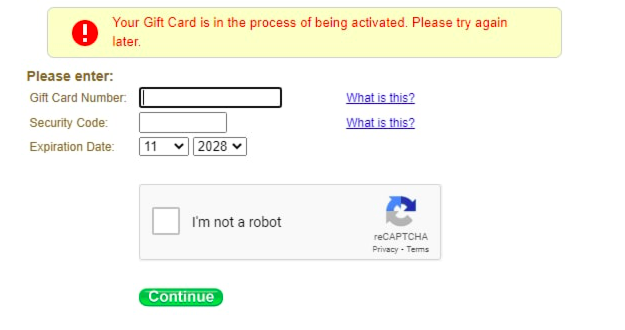
The most common Walmart Visa gift card errors include activation errors, password locks, and invalid PINs. Let’s examine some of them.
1. Gift Card in the Process of Being Activated
Usually, when you purchase a gift card, especially online, and it hasn’t registered in Walmart’s system, you will see a message saying the card is in the process of activation. In most cases, waiting 10 to 20 minutes and trying again fixes the problem.
If the message doesn’t go away:
- Visit the store where you bought the card and take the receipt with you so they can complete the activation manually.
- Call Walmart’s gift card support at 1‑866‑633‑9096 if visiting the store isn’t an option
2. Invalid PIN
An Invalid PIN error means the 4- or 16-digit PIN you entered doesn’t match what Walmart has on file. It happens due to slight mistakes when typing or pasting the number.
To fix this:
- Enter the PIN manually rather than copying and pasting it to prevent any formatting errors.
- Double-check that you’re entering the correct digits and avoid repeated incorrect attempts to prevent the card from being locked.
3. The Gift Card Password is Locked
This message appears after several failed PIN attempts, preventing you from using the card. It won’t work again until you reset it manually.
Steps to resolve it:
- Call Walmart’s support line at 1‑866‑633‑9096.
- Provide the gift card number, purchase details, and any available transaction information to verify ownership.
4. Gift Card Deprecated
Seeing a deprecated message usually means Walmart no longer supports that card, often due to system changes or the card not being linked to a valid platform.
Here’s what you can do:
- If the card is new, return it to the seller with your receipt as soon as possible.
- For older cards, contact Walmart support to find out if you’re eligible for a replacement or refund.
5. Payment Couldn’t Be Authorized or Insufficient Funds
You’ll see this error when the total cost—including taxes, shipping, or processing fees—is more than the balance on the card.
To fix it:
- Check the current balance through Walmart’s website or customer service line.
- Use the card in debit mode or split the payment between your card and another method.
When to Contact Walmart Customer Support
- Persistent Activation Issues: Contact support if your card still won’t activate after a reasonable wait or multiple attempts. Activation problems that don’t fix themselves need Walmart’s help.
- PIN or Locked Card Problems: If you keep getting “Invalid PIN” errors or your card is locked after several wrong attempts, contact customer support for assistance.
- Deprecated Gift Cards: If you see an error saying your card is deprecated or invalid and troubleshooting hasn’t helped, you’ll need to contact support. They can check the card’s status and guide you on what to do next.
How to Reach Walmart Support
- Phone Support: For urgent or complex issues, call Walmart’s customer service. This is usually the fastest way to get help. Call Walmart on 1-800-925-6278 (1-800-WALMART)
- In-Store Support: If you bought the card at a Walmart store and have issues, visit the store where you purchased it. Store associates can help with card problems, including activation and errors.
Safe Usage of Walmart Gift Cards
- Keep Your Card Information Secure: Treat your gift card like cash. Don’t share the card number or PIN with anyone who doesn’t need it. Be careful when entering card details online or over the phone, and only use secure, trusted websites.
- Avoid Common Mistakes: Double-check card details before you buy something. Ensure you enter the PIN correctly and the card is still valid. Read the card’s terms and conditions to understand how it can be used.
- Check Your Card Balance Regularly: Check your card’s balance online or in-store. This will help you know how much value is left and avoid surprises at checkout. Walmart provides various ways to check your balance online and through customer service.
Why Does Your Walmart Gift Card Say ‘Invalid’?
There are several reasons why your Walmart gift card might not work, including:
- Incorrect Activation: Activate the gift cards at the point of sale.
- Expired Cards: Some gift cards have end dates.
- Damaged Card: Physical damage to the card can make it unreadable.
- Unsuccessful Purchase: The transaction might not have been completed if the card was purchased online.
- Fraudulent Cards: Cards bought from unauthorized sellers might not be valid.
Fastest Steps to Resolve an Invalid Walmart Gift Card
To quickly resolve the invalid Walmart gift card issue, follow these steps:
- Verify the Balance:
- Visit the Walmart gift card balance page.
- Enter the card number and PIN.
- Confirm whether the balance is correct.
- Check the Activation Status:
- Ensure the card was activated at the time of purchase.
- Contact the store or platform where you purchased the card for confirmation.
- Inspect the Card:
- Check for physical damage or tampering.
- Ensure the card number and PIN are readable.
- Contact Walmart Support:
- Call Walmart customer service at 1-800-WALMART (1-800-925-6278).
- Provide the card details and proof of purchase.
- Replace the Card:
- If the card is damaged or lost, inquire about replacement options.
- Provide the original receipt if required.
Tips for Avoiding Gift Card Errors
- Document everything: keep your purchase receipt, scratch off the PIN and safeguard it, and never share your card details in public or insecure chats.
- Confirm activation immediately: if you buy in-store, ask the cashier to activate it and check it with a small test. Online, wait at least ten minutes.
- Use debit mode: when entering your card info at payment, choose debit instead of credit—this helps avoid unapproved holds.
- Check your balance after use: that way, you know how much remains and avoid overcharges or declined transactions.
Conclusion
Walmart gift cards provide ease and speed when shopping. Walmart Visa gift cards are even better because you can use them wherever Visa cards are accepted. Rarely do any errors occur, but the common ones have to do with wrong PINs, delayed activation, unauthorized payment, and brief server dysfunction on Walmart’s end. Now you know how to fix any Walmart gift card error. With these solutions, you can quickly resolve any issue with your Walmart gift card. If you still need assistance or have unique issues with your gift card, contact the vendor that sold you the card for help, and contact Walmart customer support.
FAQ
- What to do if a Walmart gift card doesn’t work?
If your Card is declined, you should check your balance either at www.walmartgift.com or by calling us at 1-866-633-9096. If you have sufficient funds remaining on your Card, please consider that the merchant may be adding a tip or some other amount to the transaction total.
- Why does my Walmart gift card say invalid?
There are several reasons why your Walmart gift card might not work, including: Incorrect Activation: Activate the gift card at the point of sale. Expired Cards: Some gift cards have end dates. Damaged Card: Physical damage to the card can make it unreadable
- Why is my card being declined at Walmart?
Payment declines at Walmart can stem from incorrect account details or mismatched billing information. Verify that your Walmart+ account number and billing address exactly match those on your credit cards. Contact your card issuer to confirm no holds or fraud alerts exist.
- Why is my Walmart gift card declining?
Payment Could Not Be Authorized. If your card gets declined with this message, the most likely reason is an insufficient balance.
- Why won’t my Walmart gift card work?
If you bought it at a Walmart register, activation happens automatically. But if your card doesn’t work later: Double-check the PIN strip on the back, scratch it fully with a coin. Visit walmart.com/account/giftcards/balance to confirm activation.